PCU Dash Display#
A simulator of the Motion Applied PCU Dash (as fitted to steering wheels). Supports multiple dash product types; auto‑loads a raw file if present (when the Raw File display property is set to Auto). Positioning/alignment controls help fit the simulator to the display window.
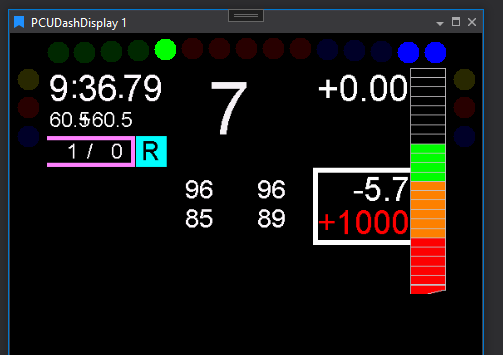
Adding a PCU Dash Display#
To add a PCU Dash Display to a Page do one of the following:
-
Click the PCU Dash Display button on the Display Toolbar.
-
Click
File > New > Displayand select PCU Dash Display. -
Press
Ctrl + Qtwice to use the Quick Access Assistant and select New PCU Dash Display.
Until data arrives, the display shows Waiting for session data.... If some dash parameters have no matching parameter in the session, the status bar tells you how many could not be found.
Display Properties#
Press D with the display selected to open Display Properties.
| Property | Description |
|---|---|
| Raw File | The dash raw file to use. When set to Auto, ATLAS loads the raw file for the session each time a new session is loaded, recording starts or the display's set association changes, if it can find one |
| Product Type | Which type of PCU Dash to simulate |
| Firmware Version | The firmware version of the selected PCU Dash to simulate |
| Horizontal Alignment and Vertical Alignment | Where the simulator sits when the display is wider or taller than the simulator |
| Background Colour | The display's background colour |
| Auto Refresh Rate | How often the display updates when data is panning automatically |
The display options, opened from the right-click menu, include Raw Files Path, PCU8D LED Status Light parameter name, Auto map CAN parameters (by name) and CAN Bus Identifier.
Right-click menu#
- Copy MD5: Copies the MD5 hash of the loaded dash configuration, so you can check the car is running the version you expect.
- Refresh Raw Files: Reloads the list of raw files, for example after copying a new file into the raw files folder.
Custom Firmware Configuration#
This is a field found in Tools > Options > Plugins > PCU Dash Display where users can set an XML file in which they can specify any PCU Dash type and firmware version of their choice which can then be selected in the ProductType and firmware version dropdowns in the Display Properties window.
The XML file selected needs have a format like this:
<PcuDashInfos>
    <PcuDashInfo>
        <DisplayName>PCU8D</DisplayName>
        <FirmwareName>PCU8E.15x23.dll</FirmwareName>
        <RawFileExtension>.rawpcu8d</RawFileExtension>
        <DrawShiftLights>true</DrawShiftLights>
        <FirmwareDirectory>C:\FirmwareFolder</FirmwareDirectory>
    </PcuDashInfo>
    <ShellPcuDashInfo>
        <DisplayName>PCU700</DisplayName>
        <FirmwareName>PCU700.01x33.dll</FirmwareName>
        <CompanionShellName>PCU700.shell.dll</CompanionShellName>
        <RawFileExtension>.mldup</RawFileExtension>
        <DrawShiftLights>false</DrawShiftLights>
        <FirmwareDirectory>C:\FirmwareFolder</FirmwareDirectory>
    </ShellPcuDashInfo>
</PcuDashInfos>
The different parts of the XML are defined as follows:
- PcuDashInfos - The XML root which stores the collection of PCU Dashes to use
- PcuDashInfo - Each of these elements contain information for a specified PCU Dash version
- ShellPcuDashInfo - A PCU Dash version which requires a companion shell dll to draw the shift lights if DrawShiftLights is set to false
- DisplayName - The product type of PCU Dash display (e.g. PCU8D or PCU700) which are selectable options in the Product Type dropdown in the display properties window
- FirmwareName - The dll for the firmware version of the PCU Dash specified in DisplayName, which turns up as a selectable option in the Firmware Version dropdown. A value in this element must be suffixed with '.dll' and no two PcuDashInfo elements can have the same value for this Firmware version
- CompanionShellName - The companion shell dll for the firmware version of the PCU Dash specified in FirmwareName for a ShellPcuDashInfo entry, needed for drawing the shift lights if DrawShiftLights is set to false. Required to sit in the same directory as the dll specified in FirmwareName and also must be suffixed with '.dll'
- RawFileExtension - The extension for the raw file type auto-loaded by the PCU Dash per product type
- DrawShiftLights - A boolean value specifying whether the PCU Dash needs shift lights drawn by ATLAS.
- FirmwareDirectory - The directory where the dll for the firmware version of the PCU Dash specified in FirmwareName is located as well as where the companion shell dll specified in CompanionShellName for a ShellPcuDashInfo entry.